| GINO Graphics Suite - GINO v9.0 |  |
 |
| GINO Graphics Suite - GINO v9.0 | |
|
The following sections describe the drawing of each of the solid 3D primitives.
Three forms of a box primitive are provided:
gDrawRect3D(xmin, xmax, ymin, ymax, zmin, zmax)The gDrawRect3D() routine draws a box whose edges are aligned along the current axes and does not have a local orientation. The gDrawCube() routine draws a cube centred at the specified position, whereas gDrawBox() is a generalised box routine, the dimension and orientation of which can be specified in one of three different ways.
Where absolute or relative vectors are used, these must be mutually perpendicular in order to maintain the cuboid shape.
Each of the obligatory and optional arguments are shown in the figure below.
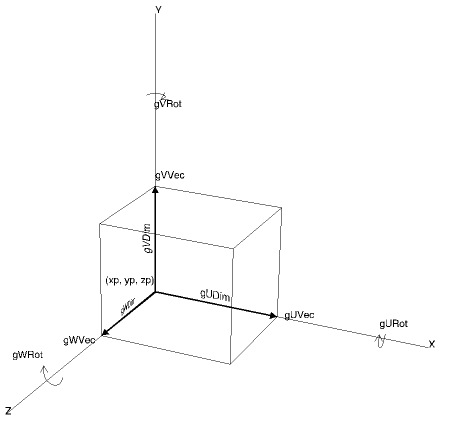 |
Box Primitive |
The optional arguments gUComp, gVComp and gWComp determine the number of sub-divisions of each face in the U,V or W directions respectively. The default in each case is 1.
A wedge is similar to a box except that one corner is cut between the upper left and lower right corners as shown below:
gDrawWedge(xp, yp, zp, [gUDim, gVDim, gWDim, gURot, gVRot, gWRot, gUVec, gVVec, gWVec, gAbs])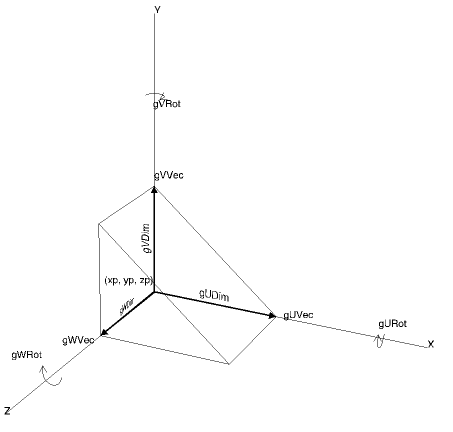 |
Wedge Primitive |
Cones and cylinders can be drawn using the following routines:
gDrawCylinder(xp, yp, zp, radius, [gHeight, gURot, gVRot, gWRot, gVVec, gAbs, gUComp, gVComp])where xp, yp, zp is the centre of the base of each object and the radii are specified as shown below.
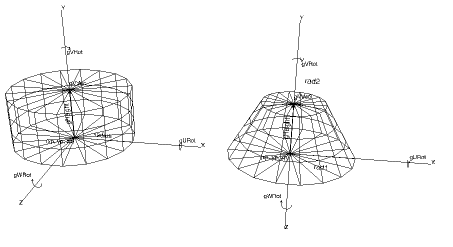 |
Cone and Cylinder |
Note that the height of either object may be specified using the optional argument gHeight together with optional local rotations set about the U, V or W axes using arguments gURot, gVRot and gWRot, or by using gVVec as an absolute or relative vector from the object's origin (i.e. the centre of the base).
The optional arguments gUComp and gVComp determine the number of facets in the circumferential and vertical directions respectively. In the above figures, the values of 18 and 3 are used.
A simple faceted sphere may be drawn using the following routine:
gDrawSphere(xc, yc, zc, radius, [gURot, gVRot, gWRot, gUComp, gVComp])Where xc, yc and zc specify the centre position of the sphere as shown below.
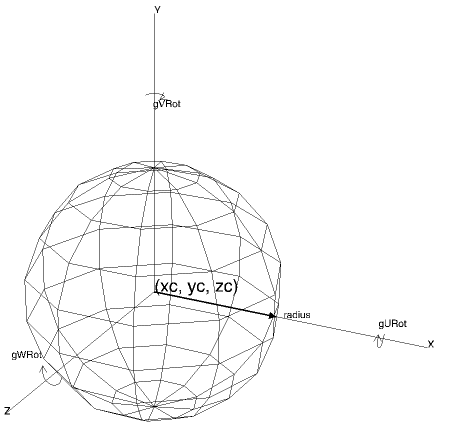 |
Sphere Primitive |
The optional angular rotations gURot, gVRot, gWRot, do not affect the visual appearance of the sphere, but may be used to control the alignment of a texture map that is added to the surface of the sphere.
The optional arguments gUComp and gVComp determine the number of facets in the horizontal and vertical directions respectively controlling the smoothness of the sphere.
Volumes of rotation can be constructed using the following routine:
gDrawVolume(xp, yp, zp, npts, points, [gVVec, gAbs, gURot, gVRot, gWRot, gUComp])where xp, yp, zp is the bottom centre of rotation of a set of points in the X-Y plane.
 |
Volume of Rotation |
The axis of rotation by default extends from the base centre vertically upwards in the Y direction, but this may be altered by specifying an absolute or relative vector (using gVVec and gAbs) or local axes of rotation (using gURot, gVRot and/or gWRot).